DiskMarkv2.0.0
DiskMark is a small utility that allows you to benchmark your disks and hard drive performance.
DiskMark is a small utility that allows you to benchmark your disks and hard drives performance. It allows you to specify many advanced options to determine how your drives perform best and to determine the typical operating performance.
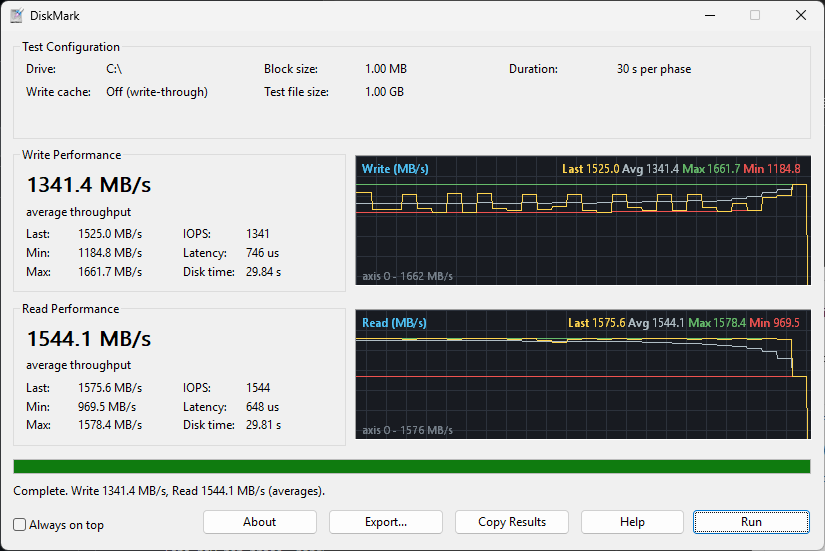
How the numbers are measured
- The test writes sequential
Block sizeI/Os to a temporaryTest file sizefile (created on the selected drive and deleted afterwards), wrapping around the file, forDurationseconds; then reads it back for the same time. Throughput is sampled once per second. - Average is total bytes / total time (not a mean of per-sample rates). Min/Max/Last are per-second-sample throughput. IOPS and Latency are per-block averages. 1 MB = 1,048,576 bytes.
- Writes use
FILE_FLAG_NO_BUFFERING | FILE_FLAG_WRITE_THROUGHunless Allow OS write caching is ticked, in which case the file flush is included in the timed region so the disk, not RAM, is measured. - Reads are always unbuffered, so they come from the device rather than the Windows file cache. Block size is rounded up to the volume's sector size.
- The I/O buffer is page aligned and filled with incompressible pseudo-random data.
- If the drive root is not writable (non-admin), the test file is placed in a
DiskMark-Tempfolder on that drive. - Validated against the Windows
PhysicalDiskperformance counters: a 20 GB-per-phase run reported 2641 MB/s write / 2205 MB/s read versus roughly 2650 / 2240 MB/s from the counters. - Export... saves the drive details (volume, file system, device model, bus, SSD/HDD, capacity), the configuration, and the write/read average, min, max, last, IOPS, latency and sample count as a text report or a CSV (one row per phase, handy for appending into a spreadsheet). Copy Results puts the same text report on the clipboard.